Backend
How code changes to the backend are published automatically.
How it works
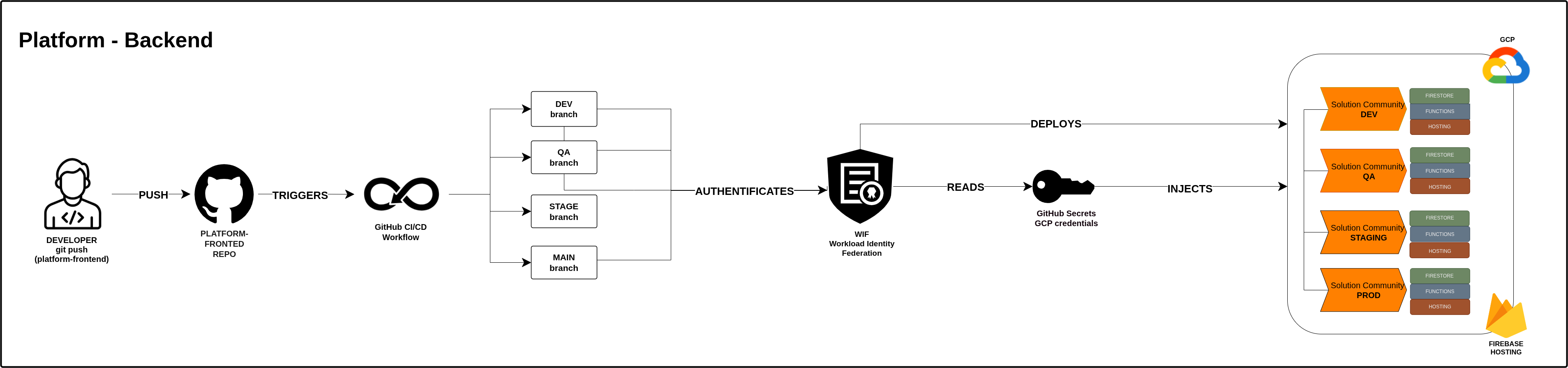
1. Developer pushes code A developer saves and submits their code changes to the Platform-Frontend repo on GitHub.
2. GitHub CI/CD Workflow triggers This triggers the GitHub CI/CD Workflow — an automated process that handles the deployment with no manual steps needed.
3. Branch determines the environment The workflow checks which branch the code was pushed to and sends it to the matching environment:
devbranch → Development (for testing new features)qabranch → QA (for the QA team to verify)stagebranch → Staging (final check before going live)mainbranch → Production (the live site real users see)
4. Secure authentication via WIF The workflow authenticates to Google Cloud securely using WIF (Workload Identity Federation).
Previously, this used a permanent password (JSON key) stored in GitHub Secrets — if leaked, anyone could access the system forever and it had to be manually rotated. WIF replaces this with a temporary token that is generated fresh for each deployment and expires automatically after use. No stored password, no risk of it being stolen.
5. GitHub Secrets provide the credentials WIF reads the GitHub Secrets — an encrypted vault storing the GCP credentials — and injects them into the deployment.
6. Deployed to Firebase Hosting Three things are deployed at once to Firebase Hosting on Google Cloud (GCP) — the database, the server logic, and the API. Each environment gets its own separate copy.
What gets deployed
| Component | What it does |
|---|---|
| Firestore (database) | Stores all application data |
| Functions (server logic) | Processes requests and business rules |
| Hosting (API) | Connects the backend to the frontend |
Environments
| Branch | Environment | Purpose |
|---|---|---|
dev | Solution Community DEV | Developers test new features |
qa | Solution Community QA | QA team verifies everything works |
stage | Solution Community STAGING | Final check before going live |
main | Solution Community PROD | The live site real users see |